One decision made before any of these steps determines how well they go: which of the two downloads you took. If a font page here offered you Variable and Static and you took the variable file, Canva and older versions of Word and Photoshop will give you trouble. The first post on this blog explains why that happens. This one is about what to do.
Unzip it, and install only the font files
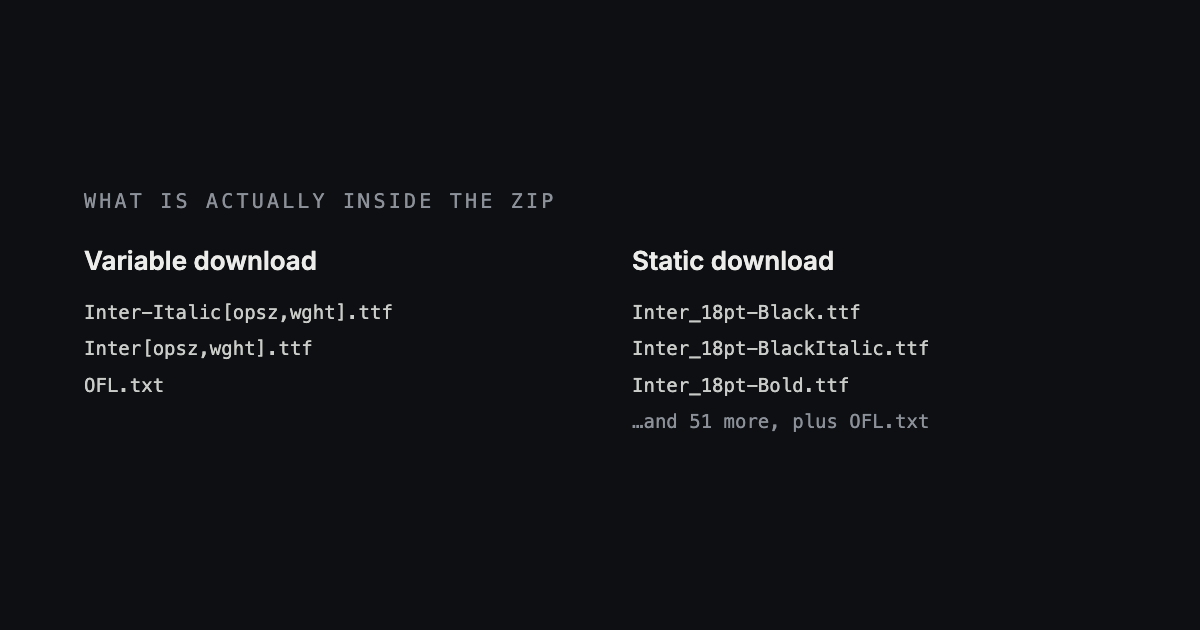
Every download here is a zip holding the font files and the licence. Unzip it — double-clicking works on both Windows and Mac — and you will find one or more files ending in .ttf, plus an OFL.txt or UFL.txt. Install the .ttf files and leave the licence alone. It is in there because the licence requires it to travel with the font, and selecting it along with everything else is the most common way to get an error on the first attempt.
The file names also tell you which download you took. A variable file has its axes in square brackets — LibreFranklin[wght].ttf. A static set has ordinary names, one per weight: LibreFranklin-Regular.ttf, LibreFranklin-Bold.ttf, and so on.
Canva
Canva is the most restrictive of the three and the one most people are working in, so it goes first. Two things are worth knowing before you start, because between them they decide whether this works at all.
- Uploading a font is a paid feature. On the free plan the option does not exist, and no amount of looking will find it. You need Canva Pro, Teams, or one of the education and nonprofit plans.
- Canva does not read variable fonts. Give it one and you get a single fixed weight with no way to change it. This is exactly why we offer a second download.
So take the Static download. Then, in the editor, open the Brand tab in the left sidebar, choose Fonts, and use Upload a font. You can also get there from your Canva home page through Brand and then the brand kit. Select all the .ttf files at once rather than one at a time — each weight is its own file and Canva groups them into a single family once they are all present, which is what gives you a working Bold instead of a second entry in the menu.
Canva will ask you to confirm you have the right to use the font. You do. Everything in this archive is licensed for commercial use, and the licence text is in the zip you just opened.
Microsoft Word
Word does not install fonts. The operating system does, and Word simply shows whatever the system has. That single fact explains almost everything that goes wrong with it.
Windows
Select the .ttf files, right-click, and choose Install. That adds them for your account only. If the machine is shared, or you are setting one up for other people, choose Install for all users instead — it asks for an administrator password and puts the files in the system Fonts folder rather than your own. You can also open Settings, go to Personalization and then Fonts, and drag the files onto the panel, which does the same thing with more steps.
Mac
Double-click a .ttf file and Font Book opens with a preview and an Install Font button. To do several at once, select them all and open them together. If you want the font available to every account on the machine rather than just yours, open Font Book first and use File, then Add Fonts to Computer.
Then quit Word completely and open it again. On a Mac that means Command-Q — closing the document window leaves Word running, and it will not notice the new font until it restarts.
Photoshop
Photoshop reads the system fonts too, so install them exactly as above. Two things are specific to it.
The first is that Adobe applications read an extra folder of their own — a Fonts folder inside Adobe's application support directory. Anything you put there shows up in Photoshop, Illustrator and InDesign and nowhere else, which is a tidy way to keep a pile of client fonts out of every other program's menu.
The second is that the version matters more here than anywhere else. Photoshop 2018 and later reads variable fonts properly and gives you a slider for the weight, so the variable download is the better choice. Anything older reads one weight and ignores the rest, which puts it in the same position as Canva. Restart Photoshop after installing either way; it builds its font list when it launches.
It installed, but the font is not in the menu
This is the most common follow-up, and it is almost always one of five things.
- Restart the program. Word and Photoshop both build their font list at launch and do not check again while running. This fixes it more often than anything else here.
- Quit it properly. On a Mac, closing the last window is not quitting. Use Command-Q and open it again.
- Check you installed the files, not the zip. Some systems will happily let you double-click a zip and appear to do something without installing anything.
- Look under the family name. The file may be called LibreFranklin[wght].ttf, but the font menu is alphabetised by family — look under Libre Franklin, not under L for the file name.
- Restart the machine. If you installed for all users and it still has not appeared, this is the one that clears it.
The font is there, but it looks like a hairline
This is the one that makes people conclude the download is broken. Nothing is wrong with the file, and it is worth thirty seconds to understand why.
A variable font holds a whole range of weights. Software that cannot read that range has to pick one point in it, and the point it picks is the one the font's designer marked as the file's default. Most designers mark 400, the regular. Not all of them do — and nothing on the outside of the file tells you which kind you have.
We read that value out of every font here, from the file itself. Eighteen of the sixty-four families in this archive do not default to 400, and six of them default to 100, which is a hairline. That is what Word or Canva will show you.
| Family | Weights in the file | Installs as | Way out |
|---|---|---|---|
| Libre Franklin | 100–900 | 100Thin | Static download18 files |
| Outfit | 100–900 | 100Thin | Static download9 files |
| Montserrat | 100–900 | 100Thin | Static download18 files |
| Manrope | 200–800 | 200Extra Light | Static download7 files |
| Fira Code | 300–700 | 300Light | Static download5 files |
| Archivo | 100–900 | 600Semi Bold | Static download108 files |
| Merriweather | 300–900 | 300Light | Noneno static build |
The fix is the static download. It contains ordinary per-weight files, and in those the regular really is the regular — install Libre Franklin's static set and Word gives you the same font it always should have.
Two complications. Archivo goes the other way — it defaults to 600, so it installs looking heavier than you expected rather than lighter. And Merriweather has no static download at all: its full static set runs past the size limit our host will serve, so in Word you are stuck with its Light. If you need Merriweather at regular weight in a Word document, that is a reason to choose a different serif for that job rather than a problem you can fix.
You do not have to guess about any of this in advance. Every font page here names the weight its variable file will install as, in the line under the download button, before you click anything.